
Good packaging photos do double duty: they show customers what they’re buying before it arrives, and they make your brand look credible on a website, in ads, or on a product listing. You don’t need a studio or a professional photographer to get there — a controlled light source, a clean backdrop, and a few editing habits will get most small businesses to a usable, consistent result.
This guide walks through the setup, the shoot itself, and the editing steps that make packaging photos look sharp and on-brand across your website, social media, and any marketplace listings you run.
Quick Answer
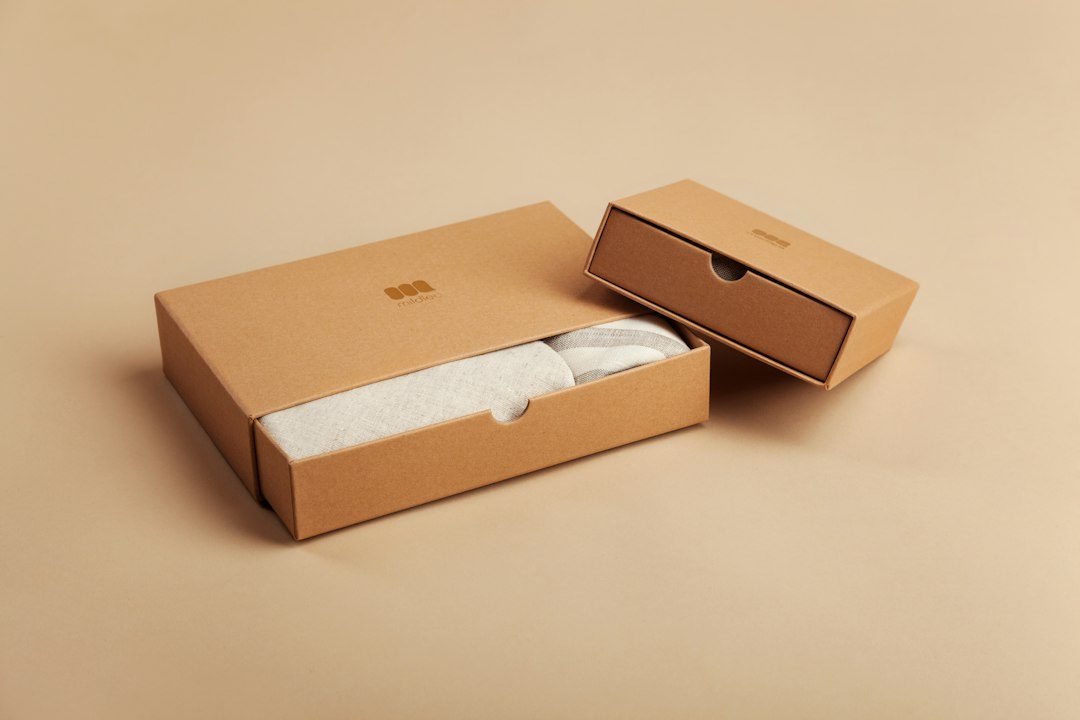
Photograph packaging using diffused, even lighting (a light tent, softboxes, or bright window light with a diffuser), a plain seamless backdrop, a tripod, and manual camera settings so exposure stays consistent across shots. Shoot straight-on, at an angle, and with the lid or label detail visible, then edit for a clean white or on-brand background before resizing for web.
Set Up Your Shoot
Start with light, not the camera. A collapsible light tent (often called a light box) with translucent fabric walls is the easiest way to get soft, even light with no harsh shadows or reflections — useful for glossy or foil packaging that catches glare under direct light. If you don’t have one, two softboxes or desk lamps with diffusion material, placed at equal distance on either side of the product, work almost as well. Natural light from a large window, with a white foam board or sheet as a diffuser, is a free alternative for occasional shoots.
Use a plain, wrinkle-free backdrop — white or light gray seamless paper, poster board, or fabric curved gently from the back wall to the surface so there’s no visible horizon line. Mount your camera or phone on a tripod so every shot in a set lines up the same way, and shoot in manual mode so the camera doesn’t darken the product while trying to brighten the background on its own. Set a custom white balance (or use a gray card) so the packaging’s actual colors — a big deal for brand consistency — don’t shift between shots.
A smartphone with a recent camera is genuinely good enough for most small-business packaging shots. Turn on the grid for alignment, tap to set focus and exposure on the product, and avoid digital zoom — move the tripod closer instead.
Shooting and Editing for Different Uses
Capture a straight-on front shot, a 3/4 angle that shows depth and any side panels, a top-down shot if the packaging opens, and a close-up of the label or key design detail. If the box or pouch has texture — embossing, matte finish, foil — angle one light slightly to catch that texture instead of flattening it.
For your own website, you have flexibility: a lightly branded or softly colored backdrop can work fine as long as the product stays easy to see. If you also list on marketplaces, check their specific rules — Amazon, for example, requires the main listing image to have a pure white background, fill most of the frame, and have at least 1,000 pixels on its longest side (height or width) so the zoom feature works. Editing the background to a true, even white (rather than relying on in-camera exposure alone) is usually the easiest way to hit that cleanly.
For editing, a background-removal tool (remove.bg and Photoroom are both solid, fast options built for product shots) can cut out the packaging and drop it onto a clean white or branded background in seconds, which is faster than manually masking in a full editor. Follow with basic adjustments — exposure, contrast, and a slight sharpness boost — rather than heavy filters, since accuracy matters more than style for packaging shots. Export as JPEG or WebP for web use to keep file sizes down without visibly losing quality, and keep a larger master file for anything printed.
Tips / Common Mistakes
Don’t shoot under mixed lighting (e.g., a lamp plus a window) — it causes color casts that are hard to correct evenly. Avoid letting the backdrop go gray or shadowed at the edges; if it’s not evenly lit, the background-removal step gets much harder. Keep the product filling most of the frame rather than shooting from too far back and cropping later, which loses resolution. Finally, shoot every product in the same setup and distance so your website or catalog has a consistent, professional look instead of a mismatched set of photos.
Explore more: more packaging design guides.
Packaging product photography FAQs
Can I photograph packaging well with just a smartphone?
Yes. A modern smartphone camera, a tripod, and diffused lighting (like a light tent or a window with a diffuser) are enough for clean, usable packaging photos for a website or social media.
What background should I use for packaging photos?
A plain white or light gray seamless backdrop works for most uses. If you sell on marketplaces, check their specific image rules — some, like Amazon, require a pure white background for the main listing image.
What’s the easiest way to get a clean white background?
Light the backdrop evenly so it’s brighter than the product, then clean it up in editing. A background-removal tool like remove.bg or Photoroom can swap in a true white or branded background quickly if the in-camera result isn’t perfectly even.
Find the Right Packaging Supplier
Search the free Packaura supplier directory — filter by material, certification, and location to find vetted suppliers. Search the Supplier Directory.
Want packaging news in your inbox? Subscribe to the free newsletter.
Photo: Sludge G / CC BY-SA 2.0, via Wikimedia Commons.